
When Lists and Listicles are used within storytelling content, they should match the surrounding typography. BUX 1.6.4 introduces font inheritance to make that happen automatically.
In our recent update on the transition from Buckeye Serif to Buckeye Sans for body copy, we mentioned that Buckeye Serif would continue to play an important role in storytelling content.
In BUX, storytelling environments include news articles, feature stories, and other editorial content where the primary goal is to guide readers through a narrative.
When content is presented in a storytelling environment, there are two component exceptions that should match the surrounding body copy.
Rule of thumb
If a List or Listicle is part of the narrative flow of the main story, it should match the font of the rest of the body copy. If body copy is supplemental material, it should appear in Buckeye Sans.
Lists in storytelling content
Because body copy in storytelling environments is set in Buckeye Serif, ordered or unordered lists that are part of the story should match that typography and also display in Buckeye Serif.
 Lists should match the font family of the surrounding storytelling content, as seen in this story from the Ohio State Alumni Magazine.
Listicles in storytelling content
Because body copy in storytelling environments is set in Buckeye Serif, a Listicle that is part of the story should match that typography. Its body copy should display in Buckeye Serif, while the title styling remains Buckeye Sans.
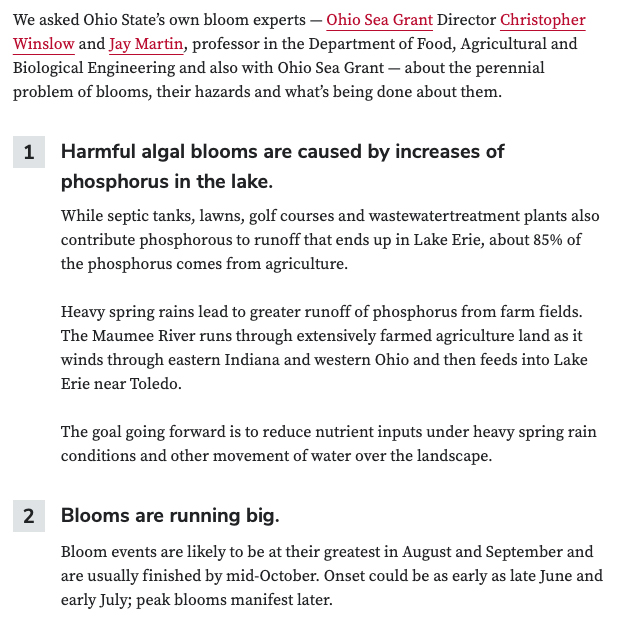 The body copy in Listicles should match the font family of the surrounding storytelling content, as seen in this story from For Ohioans.
How this is implemented
As of BUX 1.6.4, the List and Listicle components inherit the font family of their parent container. No additional configuration or styling is required, provided a font family has been applied to the parent container.
What stays the same
We reviewed other BUX components and found that no additional typography changes are needed at this time. Most components are intentionally designed to stand apart from surrounding body copy, creating enough visual distinction that their typography remains appropriate regardless of the environment. No fonts within other BUX components should be altered at this time.
If you have questions or would like to talk through your implementation, please reach out to the BUX team at bux@osu.edu.